• My Free Marketing Newsletter

How to Post on LinkedIn: 10 Tips from Analyzing 3000 Posts

This is a post by Paul Shapiro. Make sure you check out his blog, Search Wilderness and follow him on Twitter.

***

LinkedIn has opened the floodgates to a world of content with their new publishing platform and it’s an amazing way to expose your writing to a highly-professional network of readers.

Want the one email I send when I have something worth sending?

114,000+ entrepreneurs get it. One story from my business, one tactic you can use. No schedule, no fluff.

Top influencers are already publishing on LinkedIn, so people are seeking out content on the platform to read. This cannot be said about your typical WordPress blog.

Despite its awesome content marketing potential, The LinkedIn Publishing Platform is still new and understanding what makes a post on the platform perform well is relatively unknown.

(Read to the end to access bonus tips for LinkedIn Publishing Posts)

Therefore, it is imperative to understand what type of content performs best, and how to replicate that magic formula for LinkedIn content success in your subsequent posts.

There are already a number of posts on OkDork about viral content, effective headlines, and how to create great content that drives traffic.

But so far there hasn’t been a guide to what kind of posts perform best, specifically, on LinkedIn.

That’s why I took it upon myself to analyze ~3,000 of the most successful blog posts on the platform in an attempt garner some insights about what makes a long-form post on LinkedIn successful. (Click to tweet)

These posts received on average 42,505 views, 567 comments, and 138,841 likes.

Pull up a chair, a taco and let’s jump into the data!

1) Make your titles between 40 and 49 characters long

40-49 character length titles receive the greatest number of post views overall.

linkedin title lengths

2) Make your posts on LinkedIn visual! Add 8 images.
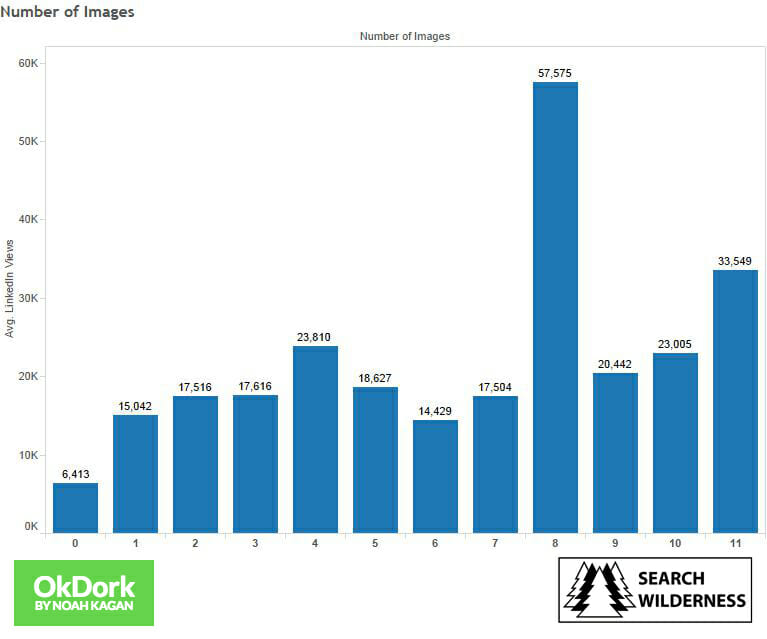
number of images in linkedin publishing posts

You should have at least one image in your post.

Including 8 images when you publish on LinkedIn is associated with a greater number of LinkedIn shares, likes, comments, and views.
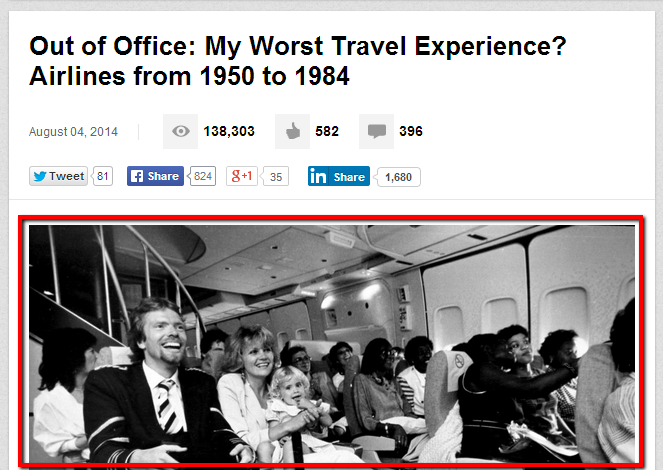
header-image

Make sure that 1 of those 8 images is at the top of the post. Many people include an image in the very beginning to act as a sort of header image.

3) Don’t add videos or other multimedia assets to your posts
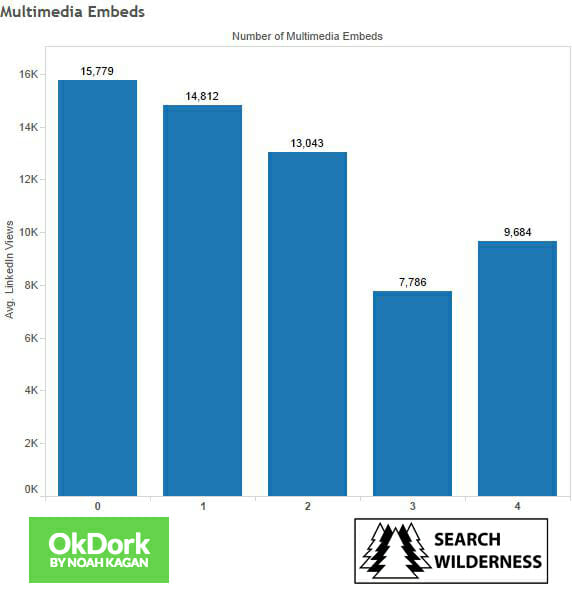
number of multimedia embeds to include in linkedin posts

Images aren’t the only aesthetic you can add to your posts.

LinkedIn also allows you to include multimedia assets (YouTube, SlideShare, TED, Getty, Vimeo, or Lifestream are supported).

Unfortunately, the data indicates that the inclusion of multimedia assets are associated with fewer post views.

Be wary of adding them to your posts.

4) Use “How-to” and List-Style Headlines

A headline can make or break a LinkedIn blog post.

Before I discuss what the data says about headline usage on LinkedIn, I’d like to take the time to make a few general comments on the matter…

Headlines are often considered the most important part of a blog post. Websites like BuzzFeed and UpWorthy have built their business around crafting content with headlines that entice click-through. A good headline can make or break a post when you post on LinkedIn.

On my personal blog, I’m a fan of crafting a dozen or so headlines, and then split-testing them.

Want more marketing tips, like LinkedIn growth strategies? Check out my podcast
Now, you can’t do this as easily when you write a post on LinkedIn, but there are some alternative options if you’re really interested in crafting the best possible headline:

  • Poll your social media audience or email subscribers. You can easily set-up a poll with Title Tester or your survey program of choice. Simply list out several headline options and ask people to click the one they feel most compelled to read.
  • Buy some AdWords ads and use different ad copy to see which one is clicked more.
  • When you write a post, publish with one headline, and Tweet the post with varying headlines along with different unique Bitly links. Then edit your post headline to use the version that had the greatest click-through rate.
edit-post

Back to the LinkedIn data…

Don’t write Question Posts—LinkedIn posts where the headline poses a question perform poorly.
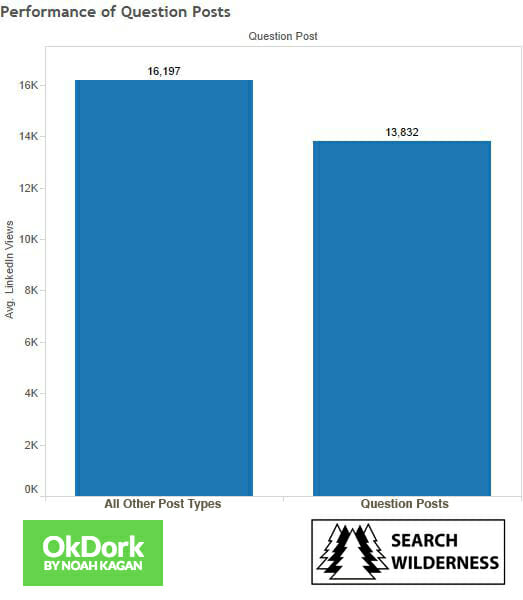
performance of question posts on linkedin

Do write “How Posts”—These posts perform best across the board in terms of LinkedIn Publishing metrics.
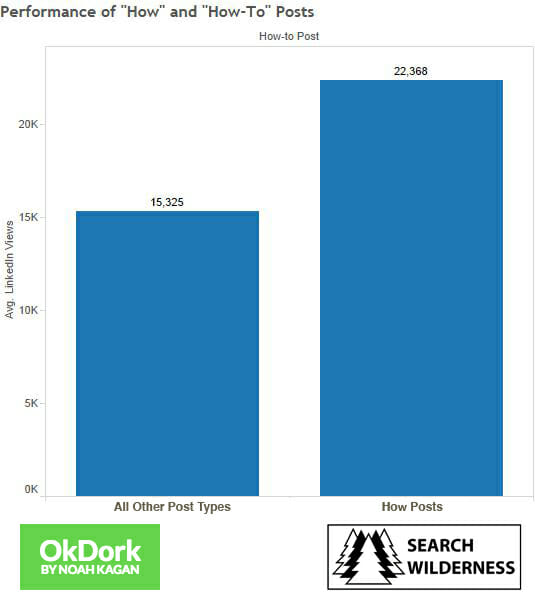
performance of how posts on linkedin

Do write “List” posts—These posts perform well, getting slightly more post views, post likes, LinkedIn post comments, and LinkedIn Shares than non-list posts.
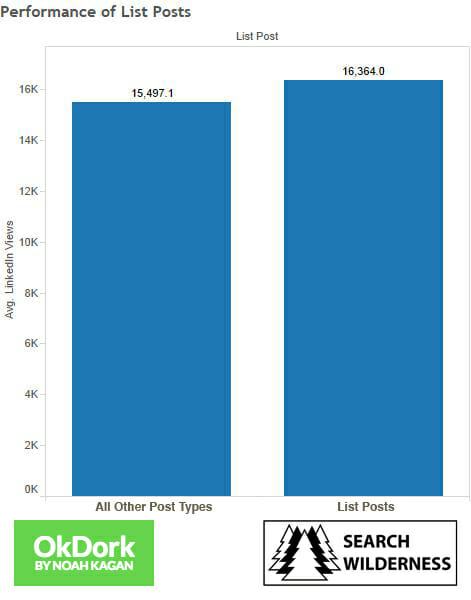
performance of listicle posts on linkedin

So…

Don’t write headlines like:

“Do Business Schools Breed Arrogance?”

Write them like:

“Business Schools Breed Arrogance”

“12 Reasons Business Schools Breed Arrogance”

“How Business Schools Breed Arrogance”

5) Divide your post into 5 headings in order to attract the greatest number of post views.
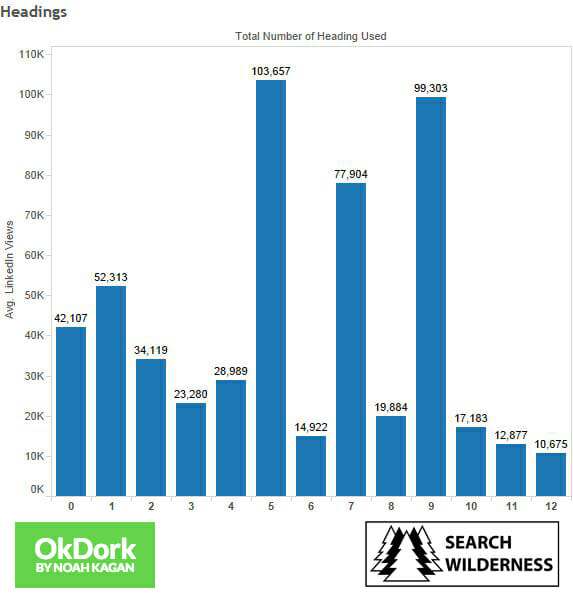
linkedin performance by number of skimable sections

Using headings (H1, H2, H3 tags, etc.) to break your post into easily digestible (and skimmable) sections will help your post perform.

headlines

6) People like to read long-form content on LinkedIn—1,900 to 2,000 words long
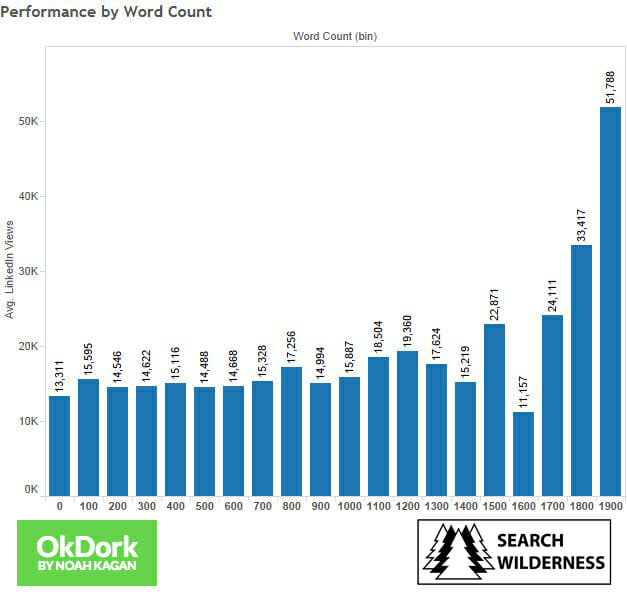
performance by word count on linkedin

On average, the longer the post, the better.

Post with large word counts perform well.

Posts between 1900 and 2000 words perform the best and gain the greatest number of post views, LinkedIn likes, LinkedIn comments, and LinkedIn Shares.

7) Don’t get your audience all fired up
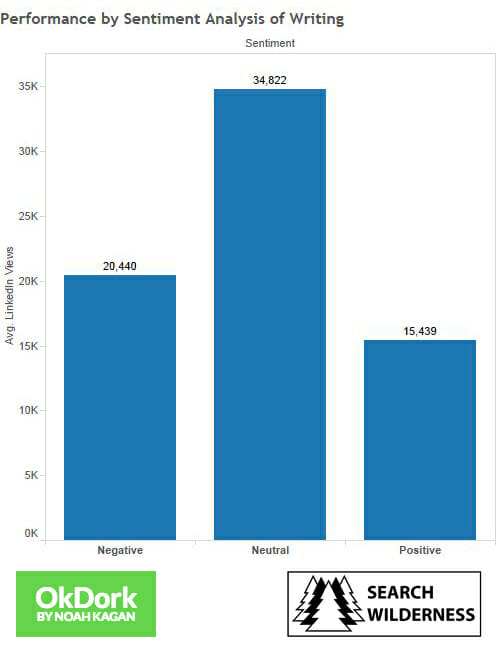
linkedin performance by post sentiment

Posts written in language reflecting a positive sentiment tend to get the most LinkedIn shares and likes.

However, neutral language posts tend to see more comments and post views than both positive and negative sentiments.

For example, the following text is from a post written in a neutral tone:

“Aside from the military, real estate agents, especially those selling high-end homes, use drones to fly over their listed properties and capture aerial footage of the grounds and surroundings. Likewise, professional photographers use them to capture unique photographs that would be hard to get by walking…”

About the topic of drones, it is neither positive nor negative. It is neutral and all about stating the facts.

If the sentiment of your post is not inherently clear to you, there are a number of free sentiment analysis tools you can use to assess your writing.

A positive sentiment score will be greater than 0, a neutral score will not have a score, and a negative sentiment will be less than 0.
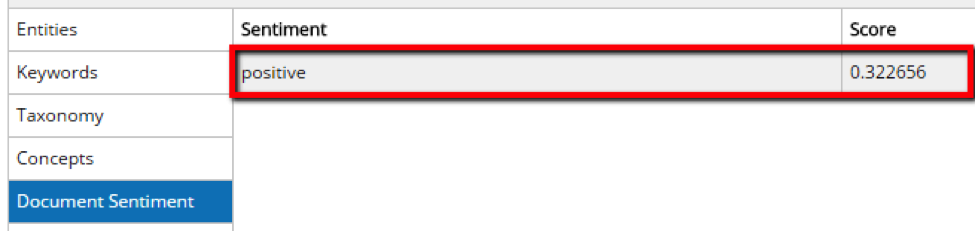
using alchemyapi to detect sentiment

So, if you’re looking for feedback from your posts, or traffic, go all Switzerland with your writing and keep it neutral.

8) Make your content readable for an 11-year-old
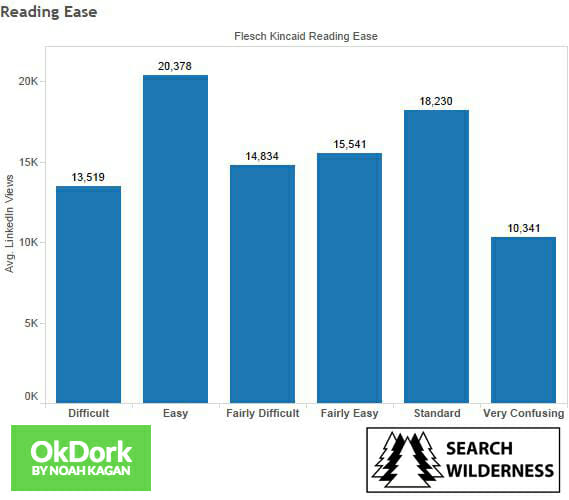
flesch-kincaid reading ease of linkedin posts

For those of you that are unaware, the Flesch-Kincaid Reading Ease test is a means of assessing the comprehension difficult of English text. Readers Digest for example, is know to be written in a Flesch-Kincaid Readability Score of around 65, which is considered “Standard” difficult, easily read by 13-15 year olds and by 80% of adults. (Click to tweet)

flesch reading ease explanation table

Despite what conventional wisdom might say about the LinkedIn audience being more educated, an “Easy” (Flesch-Kincaid Readability Score 80-89) readability level attracts more post views, LinkedIn shares, and LinkedIn likes to the LinkedIn publisher post.

9) Promote your LinkedIn publisher post on other social networks!

If you are planning to use other social networks to promote your LinkedIn publisher post, which you should, Tweets have the highest correlation to LinkedIn success metrics.
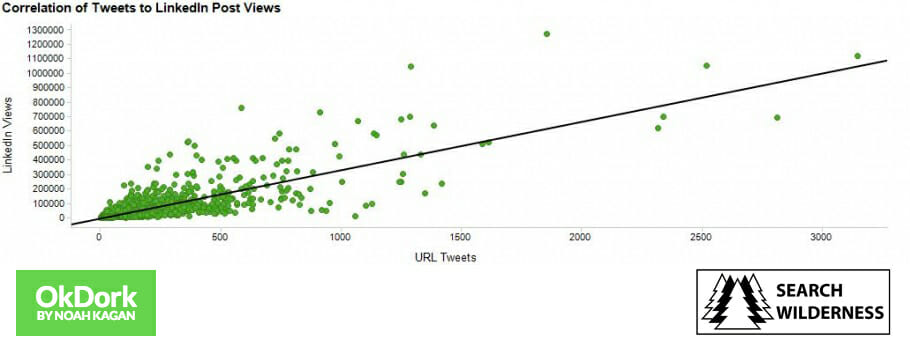
correlation between tweets and linkedin post views

For the data nerds reading:

  • 0.81 Spearman R for Tweets to LinkedIn post views (R-Squared is 0.65)
  • 0.83 Spearman R for Tweets to LinkedIn Shares (R-Squared is 0.69)
  • 0.81 Spearman R for Tweets to LinkedIn Likes (R-Squared is 0.66)
  • 0.69 Spearman R for Tweets to LinkedIn post comments (R-Squared is 0.47)

Whenever you write a blog post, on any platform, it is important to promote it.

The LinkedIn publishing platform is no exception. I adhere to the 80/20 rule. Spend 20% of your time crafting content and 80% of your time promoting it. (Click to tweet)

A part of that 80% time should be spent branching out to other platforms for promoting your LinkedIn post, like Twitter—which the data says supports its success.

Tip: You can use a tool like Twitter Analytics or Tweriod to determine the best times to promote your posts.

10) LinkedIn likes get you views, shares, and comments

LinkedIn post likes are the common denominator between the other LinkedIn metrics. More post likes will also get you LinkedIn shares, post views, and comments according to correlation data.
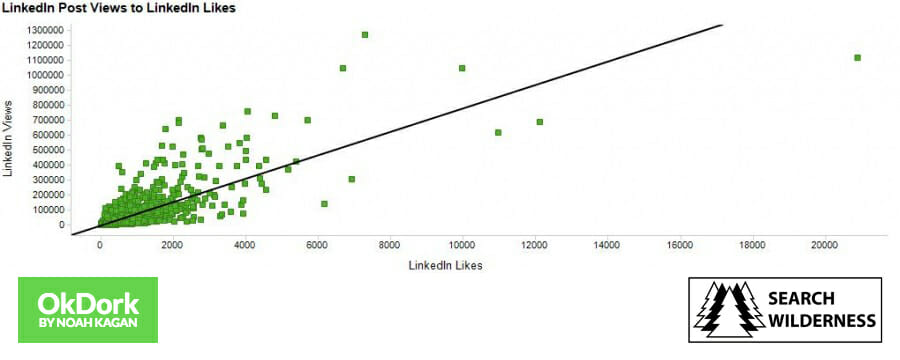
correlation between linkedin likes and views

Again, just for us data nerds:

  • LinkedIn post views are most correlated with LinkedIn post likes (0.77 Correlation Coefficient)
  • LinkedIn Shares are most correlated with LinkedIn post likes (0.94 Correlation Coefficient)
  • LinkedIn post comments are most correlated with LinkedIn post likes (0.84 Correlation Coefficient)

Tip: Adding a call to action at the end (or beginning of your post), encouraging people to click the thumbs up and like the post is likely a very effective way of gaining more views and shares.

thumbs
If you enjoyed the post, please click the thumbs up icon above and let me know!

The effort required to like a post is less than adding a comment or even sharing it, but it can lead to both!

Bonus Tip (#11): Publish your LinkedIn posts on Thursday
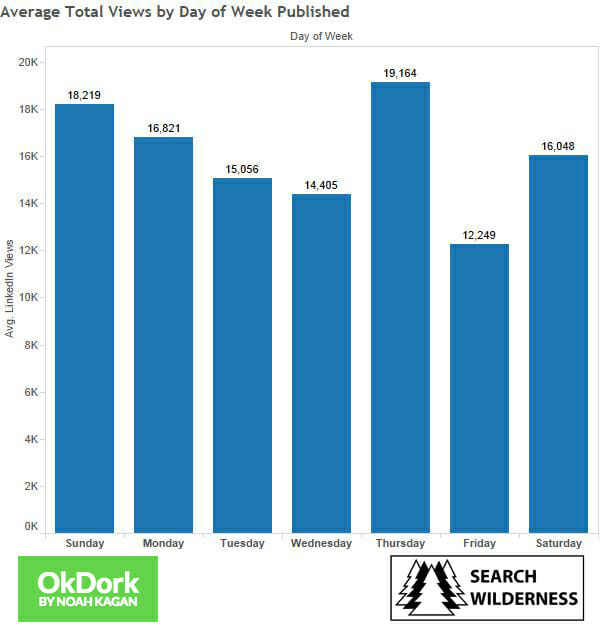
Average Total Views by Day of Week

Summary

In order to get the maximum number of post views…

  • Your title should be be 40-49 characters long.
  • Include 8 images in your post.
  • Don’t embed multimedia such as YouTube videos into your blog post.
  • Write How-to posts. They perform the best. You may also write a List post, but they don’t perform nearly as well as How-to posts. Don’t write a question post.
  • Divide your post into 5 sections with headings (h1, h2, h3, etc.)
  • Write between 1,900 to 2,000 words.
  • Your writing should have a neutral tone.
  • Write your post so it can easily be understood by the masses, preferably with in an “Easy” readability score of 80-89 which is easily read by an 11-year-old.
  • Publish your post on Thursday for maximum number of views.
  • Cross-promote your LinkedIn posts on Twitter.
  • LinkedIn post likes are the common denominator between the other LinkedIn metrics. More post likes should also get you LinkedIn shares, post views, and comments according to correlation data. You can encourage people to like your post with a call to action.

A Final Word

The data is there to guide you. These are only suggestions.

Of course, there will be the occasional outlier, exception to the rule, or variable we didn’t account for.

And you may be that representative example.

If you try something here that doesn’t work, test it, or try something different. In the end, you should be doing what works.

Now You Try It

Go forth and dominate the LinkedIn publishing platform and let the data guide you!

Get featured in your channel of choice, get tons of post views, send referral traffic, use it for SEO, or get email list subscribers. The world is wide open.

In addition to the data, I put together a bonus section that shows you exactly how to make content on LinkedIn get more views. You can access the bonus content here.

If you have a question or thought, leave a comment below, and I’ll do my best to satiate your hunger for knowledge.

P.S. OkDork is giving away 10 copies of the new book Smartcuts: How Hackers, Innovators, and Icons Accelerate Success to the first 10 commenters. Leave a comment with the funniest title that describes your job.


Join 157,000+ subscribers getting my FREE weekly business tips

Million Dollar Weekend by Noah Kagan

Start a business in 48 hours.

Million Dollar Weekend is the process I used for eight businesses, written down. #1 on Amazon and Audible.

Read the first chapter free

Leave a Reply

Your email address will not be published. Required fields are marked *

336 responses to “How to Post on LinkedIn: 10 Tips from Analyzing 3000 Posts”

Dean LaBay
November 3, 2024 at 7:33 am

Interesting read my title Paperclip Salesman

surya kandalgaonkar
August 10, 2023 at 6:41 am

Most helpful, straight shooter, thank you! But there is extra be in summary ” Your title should be be 40-49 characters long.” Please make correction.

1stepgrow
July 6, 2023 at 5:46 am

Thank you for the valuable information on the blog.I am not an expert in blog writing, but I am reading your content slightly, increasing my confidence in how to give the information properly. Your presentation was also good, and I understood the information easily.

The Time-Lord
June 27, 2023 at 4:33 am

Great advice, but, how do you use H1 to create a header, in a LI post? I cannot work out how to use HTML in a post. How do you include up to 8 images in a post? I can only use one image, unless I use a carousel. How do you use so many characters in LIN? I can on.y use around 1,300. The essential how to, is missing from this article.

Chisomo Kasitomu
October 9, 2022 at 2:50 pm

Thank you so much for the tips very helpful. I was not so sure of how to post article confidently.

Jonathan
March 13, 2022 at 11:54 pm

Before, I thought that an article must have an image or video to attract viewers, just like facebook. Thanks for your post, I have reloaded linkedin on apkdownload and try again see if it works

Mildred Dillon CPA
March 3, 2022 at 7:15 am

This was great! ? Just what I needed to take on articles!

Pamela Cournoyer
December 1, 2021 at 3:44 pm

Most helpful, straight shooter, thank you!

Romy Serfaty
September 10, 2021 at 1:08 am

Hello, are we talking here about the “Articles” section of LinkedIn, or just regular posts?.
Thanks!

Margareth Fabiola dos Santos Carneiro
March 26, 2022 at 7:15 am

This is my doubt as well.

Birgines
August 9, 2022 at 6:57 am

The writer describes it as post but everything in the blogpost refers to LinkedIn-Article

Bill Buckley
April 16, 2021 at 11:39 am

Thank you for this wonderful breakdown. I’ve recently ramped up my LinkedIn profile but have been hesitant to post things because I don’t want to spend a lot of time for nothing, and also I want to be confident what I post will be relevant, at least to some readers. Cheers!

Dr. Scott Dell
April 5, 2021 at 7:16 pm

Insightful! Thanks for sharing!!

Mark Mason-Jones
March 26, 2021 at 2:00 am

A very useful article, thank you! Particularly interested in your advice against including video. Staying within a single medium has always made sense to me, but the proliferation of video on LinkedIn recently has made me wonder whether this is the best approach. So thanks for the reassurance!

Jacob Dor Menachem
March 18, 2021 at 4:51 pm

Referring to your article, is there a difference between the “post” and the “article” feature on Linkedin?

Amanda
March 1, 2021 at 5:32 pm

Assuming that these are stats for articles and not posts?? A post cannot have different text styles such as h1, h2 etc.

Kelli
April 10, 2022 at 9:45 am

It appears this is about articles vs posts. However, you can copy and past your post text into a tool like yaytext.com and manipulate the text to create bold, italics, etc. that you can then paste into your LinkedIn post.

Lori Goldstein
February 27, 2021 at 7:32 pm

Thank you for this valuable advice! I have been struggling with this.

Joel Thomson
February 21, 2021 at 11:38 pm

Isn’t this guidance on writing a LinkedIn article? Posts are short, articles long, what am I missing?

Rebecca Perry
January 28, 2021 at 4:07 pm

You need to explain up front that this is for blogs. You keep saying “posts,” but it’s not a post you’re talking about, it’s a blog. Your title is completely misleading for those looking for information about posting on LinkedIn.

Kurt Mikkelsen
January 13, 2021 at 10:59 am

LinkedIn only allows 1300 words. Please comment on this!

Joanne Goldsmith
December 15, 2020 at 1:39 pm

Cat Lady goes wild with more cats and an couple dogs too.

Cat lady has 10 cats. Four of the cats are from first litter of momma cat 11 yrs ago. The new generation of 6 kittens 3 boys and 3 girls are 5 in a half months old.

The dream is to have a cat / animal blog or vlog ( video blog )

would you recommend wix website to make it happen?

Nigel Quick
December 14, 2020 at 9:50 am

Just what I was looking for. Makes a lot of sense, proof will be in the pudding as I follow them.

Rae Hope
November 10, 2020 at 2:43 am

Quill-flicker… I’m a new copywriter, I’m sure I’m too late for the book, but worth a try if its as well written as this article.

Thank you, excellent tips! Totally appreciate your expertise, where would we be without data nerds…?

Deb
November 6, 2020 at 12:56 pm

What is your opinion about using content from an already existing blog post for a long form post on LinkedIn? Duplicate content an issue?

Mogo
October 27, 2020 at 5:02 am

great tips

Keith H
October 19, 2020 at 1:44 pm

Hi Paul,
Excellent and seminal essay. One issue that had me confused for a while was the title: “How to Post on LinkedIn: 10 Tips from Analyzing 3000 Posts” Linkedin (as you know) have 2 ways to publish content: Post and Article. It took me a while to twig this was for Articles and not the shorter Post…the word used in the title. After reading other explanations I unraveled my confusion. Have you uploaded similar tips for the shorter LinkedIn Post? I’m prepping to upload and spent a while researching and creating image templates – so I know exactly what portion of the image appears in the thumbnail and which portion appears when viewed. (vs. just uploading a JPG/PNG and hoping for the best.) Thanks again. Keith H. London, UK.

Maarten
October 18, 2020 at 4:49 am

Thanks for sharing these valuable tips!

Hammad
September 20, 2020 at 5:57 pm

These are some interesting tips for LinkedIn.
I have experimented a lot, and my view is that targeting is really important.

Teresa Marie
August 15, 2020 at 7:49 pm

Pen Slingers (funny name for copywriters) I may be too late for the free book but it’s worth a shot. Your article is excellent also. I will be utilizing all 11 tips. Thank you!

Aytug
August 4, 2020 at 7:42 am

Hello, I wonder how we can put 2000 words into Linkedin posts when there is a limit of 1280 characters limit for posts. Please inform me how to loophole around this restriction, if you know.

Eddie Longworth
September 24, 2020 at 7:15 pm

Hi. The high word count is referring to your published article on the LinkedIn platform and not to the actual ‘posting’ on your timeline which, as you say, is limited.

Romy Serfaty
September 10, 2021 at 1:10 am

Good point. It must be referring to the “Articles” section of LI

Ian
January 13, 2022 at 7:13 am

I think the article is somewhat out of data and just the date on it has been updated. They’re referring to Linkedin articles not posts – and for some time articles have underperformed posts in terms of visiblility.

Trivikram
August 2, 2020 at 1:58 am

I appreciate your understanding on the LinkedIn Metrics and thank you for sharing such an useful content.

Brian Laurie
July 30, 2020 at 11:05 am

Thanks so much. I’ve been looking for something like this!

Jeremy Dcruz
July 1, 2020 at 5:42 am

I write to save my skin.

Great piece of information, I will put this to work

David James Chevalier
June 14, 2020 at 11:33 pm

Great, I am going to install your posting ideas this week. Good read.

Kegesa Danvas
May 24, 2020 at 10:22 pm

Such a resourceful piece. Many thanks for sharing.

Cenk
May 20, 2020 at 4:27 pm

Valuable insight and interesting statistics.

Madhuri Lele
May 13, 2020 at 2:22 am

Hi Paul,
Superb, a great guide to what kind of posts perform best, specifically, on LinkedIn to aspiring ones. Even giving tip on keeping in mind Easy” readability score!

Sue
April 23, 2020 at 2:48 pm

Great read and thoughtfully put together with stats! Thanks a bunch. Wish I was one of the top 10 but missed it.

Galaxy Marketing
April 6, 2020 at 3:39 am

I found your post interesting to read. I cant wait to see your post soon. Good Luck with the upcoming update. This article is really very interesting and effective.

Mary Anne Doggett
February 24, 2020 at 1:48 pm

Great article!!! Question: Any stats on Re-posts of older articles you have written for linkedin that are still relevant?

Sociflux
January 24, 2020 at 12:08 am

<3 a great post, man! Love it, thanks for sharing. It is very helpful. Surely, I will take care of these things in my next post.

Marjolein
January 12, 2020 at 12:29 pm

Great article! Thanks for all the research, must have been a lot of work.

Neil
January 11, 2020 at 4:12 am

This may seem trivial but the title length analysis – was that including spaces or without?

Sandeep Jindal
December 24, 2019 at 1:17 am

Hi Paul. Thanks for sharing these useful tips. I was wondering if there is also a correlation around the time of posting on Thursdays.

Shady Salah
December 19, 2019 at 5:54 am

this is so insightful

Dave Paprocki
December 13, 2019 at 1:39 pm

Thanks for doing the research on this. I found it helpful and clear.

Writer
December 11, 2019 at 6:45 am

Thank you very much for publishing such a large list of useful tips. I really hope you will continue to publish this type of content.

Jo BB
November 27, 2019 at 4:03 am

Thanks so much for the tips! I will launch my first blog post on Thursday! 🙂
QQ: How will I know which hashtags to use to add traction?

Dan
October 21, 2019 at 7:28 am

Love the article, great template for linkedin newbs and ninja’s as based on such a wide sample. I shall be using this advice from now on.

Ken Schreck
September 29, 2019 at 5:47 pm

Excellent article Noah! I am just having one question which I couldn’t find answered in your article. Should we include external links into the LinkedIn article, or is it better to avoid it?

Simon Boylen
September 3, 2020 at 9:29 pm

Thanks for sharing your tips. I’ll use your advice on pictures and headings.

Sean Oliver
September 13, 2019 at 11:55 am

Super helpful. Using this today

Joseph
September 8, 2019 at 6:50 pm

Amazingly helpful metrics for being successful (or at least posting successfully) on LinkedIn. Thank you

Michelle
August 23, 2019 at 4:55 am

Great tips – thanks for sharing I’ll be adopting these. Have found that slide shares and video do get us a good number of likes etc so will continue with these to see how it goes.
Unfortunately the ‘access bonus linked in content’ link didn’t work for me…

john wicks
August 22, 2019 at 3:09 am

Wizard of Light Bulb Moments

Thomas
August 14, 2019 at 7:52 am

Thanks for that helpful overview. I will use that infomation to make the next posts.

Jordan Shaw
July 28, 2019 at 11:39 pm

This article is incredible! Thank you so much for the qual/quant aspects. I’m in the process of transitioning | learning the digital effectiveness from the Marketing perspective. I’m in a tough season of unemployment and have a background in Strategy and Sales Analytics, so adding this skill set is exciting and am hoping to grow to a space where I will be more well-rounded. Thanks again!

Lindsay McGhie
July 27, 2019 at 9:57 am

Highly informative

Mirza Yawar Baig
July 20, 2019 at 8:16 am

Excellent article. Thanks a ton for this. Most appreciated.

Carolyn Ball
June 22, 2019 at 6:15 am

You mention longer posts being read more, but posts are short. LinkedIn uses the word article for lengthier writing. Posts don’t have headings. Again, are you talking about articles?

Dr Lana Walton
June 13, 2019 at 5:43 pm

Thank you so much for the advise . It will really help me. I have posted at least 21 articles and often wonder are they being viewed.

Gaurav
June 23, 2019 at 11:42 am

Can you share a couple of your articles? I need to start crafting these for a client! I’m an active blogger and specialize in long, evidence-based scientific pieces. But I’ve never written a long form LinkedIn post! Would love to read yours.

Dawn
June 12, 2019 at 5:10 pm

Thank you that was helpful

Neelu Bala
June 11, 2019 at 5:20 am

The above article helps to write the LinkedIn publishing the article or the content for the students or the writers.

dskapil
May 5, 2019 at 4:48 am

No bonus content present…

Johann
May 2, 2019 at 2:54 am

Hi Thanks! Most informative!
How do I publish an article on the LinkedIn platform (not on my personal profile) please?

devinda senanayake
May 25, 2019 at 1:13 pm

hi, as far as I know, you can’t publish your post on the LinkedIn page. this article talks about publishing the article on your page. they will still get views from people other than those who are in your network. Not sure, I think probably LinkedIn also promote your article to the relevant audience. (most of these are guesses, but I think this is how it works)

Nicky
March 25, 2019 at 12:15 am

Sent my email address trying to get the LinkedIn bonus but nothing came.

Mae Hardin
April 26, 2019 at 8:35 am

Same thing happened to me. Found the article helpful, but was curious to get the rest of the info.

Shirley
March 21, 2019 at 7:42 am

Great clear presentation of the rationale behind your suggestions, thanks.

Riad M Mahfouz
February 27, 2019 at 4:38 pm

I can relate to most of the ideas except Your writing should have a neutral tone. I think it’s very subjective. I suspect there is another variance at play!

Don Duke
January 29, 2019 at 6:56 pm

Thank You, for the help. I am most confounded that I write my article on google docs and I use color to highlight important facts or statements. Then when I paste it into my IN post it changes the entire format into a plain article completely separated one line from another. I have to edit and pull it all back together and still have no color or fonts or size choices. Why can’t Linked IN just give us more choices like google docs? Thank you for consideration. Don Duke///

Jeffrey Keth
January 22, 2019 at 11:50 pm

Great article, thanks for sharing information with us!!! keep doing good work.

Esteban Romero
January 18, 2019 at 6:34 pm

Thank you for the data and great insights! Much appreciated 🙂

Harry B. Flotemersch
January 12, 2019 at 11:56 am

My job is to confidentially make annoying problems that someone has had plaguing them for for a long time go away. I’ve been making a living doing this for a long time and almost no one wants to take on the challenge and thinks it is silly to sign up for it. I love it!

Khairul Abu Bakar
January 6, 2019 at 4:33 am

A very good insights. Thanks so much

Kurt K
January 4, 2019 at 4:39 pm

Hi thank you, great information
Bonus items link does not work

Lenka
December 17, 2018 at 9:40 am

Really useful article! thanks for writing this 🙂

Anna
December 9, 2018 at 12:37 pm

Thank you a lot! Very helpful article as I am just starting my adventure with LI 🙂

Derek Cullen
November 11, 2018 at 2:01 am

Fantastic, thank you so much for the help and guidance!

Rehaan Mehar
November 10, 2018 at 2:12 am

This is great! I just started writing articles on LinkedIn and this is just what the doctor ordered. Thank you.

David Richards
November 6, 2018 at 4:38 pm

This is just the sort of information I need right now. Thanks for putting in the work.

Steve 'Woof' Ashby
November 4, 2018 at 8:34 am

I’m a dinosaur at 64. the *average* age of my team of 4 goes up 10 years when I sit with them.
My job title “Old dog learning new tricks.”

Robert Rundberget
October 25, 2018 at 10:55 am

I was a bit puzzled about the tip NOT to include video in a Linkedin Post. Especially since it says that the article was last updated in 2018 (I saw just now that comments are from 2014, which makes more sense). I’m curious to know if you have access to more recent statistics that says anything about what amount of engagement native video on Linkedin gets, compared to other types of content. There is a quote flying around the internet, supposedly by Peter Roybal, that says “We’re seeing videos being shared 20 times more than any other type of content across LinkedIn”, but I have not found any real data that supports that claim. Makes me wonder what the reality is as 2018 is about to end? You have any clue?

Mario B.
November 2, 2018 at 1:19 am

I can’t speak to LinkedIn, but I’ve managed several high-budget digital campaigns on FB and I can tell you that the whole video craze and stats are complete nonsense. I have found that certain useless metrics go way up with video but substantive stats that correlate to action and sales are unaffected. “Views” are a highly distorted figure in analytics reporting by social media platforms. So be cautious not to pay too much mind to them, or spend too much of your budget focusing on those. Ultimately, it really depends on the digital strategy you’re planning to implement. For simple brand awareness and exposure campaigns where you aren’t relying on real return but need to see people are gaining awareness, video is fine and often times the best way to get across a singular message.

But for actionable results in terms of your sales funnel or substantive actions outside of your post, video has very little additional affect if any. In fact in my campaigns, it actually hindered any additional actions because people would view the video through autoplay features and move on without clicking or taking any further actions. Likes may mean more exposure, but they rarely translate into $. I would use video in an integrated approach and solely for exposure. When it comes to real spending and return, stick with a relevant photo as your lead visual and behind that you can throw a link to something with more info that may contain a video, but the trick is to get them there first. I say all this with having run campaigns to the tune of about $30,000USD and spent in total about $250,000USD over the course of the last 3-years, so I can say my experience is pretty current and involves a lot of tinkering. If you want to use video and have users take action, stick your video on a landing page on autoplay behind your main paid post. FB Canvas is great for something like this if you don’t have your own server or site to launch behind your ads.

Dylan Carroll
January 21, 2019 at 4:37 pm

Read comment below. Some agree with me that the tip to NOT use videos is interesting to say the least. Digital marketing is trending towards video marketing. It has hit every social media platfrom, and will make a impact on LInkedln. If you would like to debate, please email me. Thank you.

Kornel
September 28, 2018 at 2:18 am

Great advise some of it I found out the hard way with trial and error, it is fun though to read about it realising that my conclusions where true.

Janet Kelly
September 18, 2018 at 5:35 pm

So excited to put my post on. Then waited for the 1000’s of views. Crickets.
My lowest views ever. Thought I did everything “right”. Article for my ideal client, 8 images and a great article.

Harrison
September 27, 2018 at 11:07 am

Hey Janet,

I’ve followed guides like this before for optimal posting on: Medium, my personal blog, and optimal sharing on other social platforms.

And I too published to crickets – on my first post! Try following this guide for your next 100 LinkedIn posts and see what happens after you have a more statistically significant sample size.

That’s my plant 🙂

Hope this helps,
Harrison

Prof. Jeffrey R. Rath
September 17, 2018 at 6:44 pm

What If your LinkedIn Articles are hacked after posting and many of your Articles ‘disappear’ from your Profile, I clearly am Not the only one. LinkedIn has no Support. Try and use the LinkedIn Forum options and LinkedIn Moderators remove the Post replies.
Try and ‘Edit’ or Repost and the Publish page comes back ” there was a problem…”
Appears that LinkedIn is aware of their vulnerability, but won’t do anything about it, Support LinkedIn Members or fix it. What can one due? Thank you.

Prof. Jeffrey R. Rath
September 17, 2018 at 6:35 pm

Excellent tutorial on the effective use of LinkedIn Posts. Worth the read.

Daniel
August 21, 2018 at 5:14 pm

This is an insane amount of info that is filled with facts. Thank you for this!

John Irvine
August 20, 2018 at 7:52 pm

The “Santa” of the highways delivering parcels all year round (DHL)

tania
August 17, 2018 at 3:57 am

Great post thanks! With regard to the call to action to like….
“If you enjoyed the post, please click the thumbs up icon above and let me know!”

Is there a way to embed those icons at the bottom of the post as well? Or are you referring to above as in above the post under the headline?

If there is a way to repeat the icons at the bottom, how do you do it?

Chen Yuyuan
August 9, 2018 at 10:42 am

Thanks for putting together the data and suggestions. Helpful as a guide for writing my LinkedIn posts.

Jodi
August 1, 2018 at 9:35 pm

Great advise! Love the data goobers … thank you.

Mario Patane
July 22, 2018 at 9:27 pm

This is a great post into the research you have done to identify what leads a good LinkedIn post. This post has been very helpful.

Coleen
July 12, 2018 at 2:29 pm

Paul: excellent article. I have a question about the chart showing best times to tweet. Are the times shown Eastern?

Lavina Walter
July 6, 2018 at 1:41 am

Hey Paul, thanks for sharing your 10 LinkedIn publishing tips. Indeed, getting featured in your channel of choice, getting tons of post views, send referral traffic, use it for SEO, or get email list subscribers would be so great. Keep posting!

Manuela Boyle
July 3, 2018 at 7:03 pm

Thank you

Sabrina Lisen
June 28, 2018 at 12:49 am

Great quantitative, research-driven guidance. I’m looking forward to diving into more of your ideas. Thanks!

pedro
June 24, 2018 at 9:32 pm

great

Bob Dunn
June 20, 2018 at 10:50 am

Fantastics tips! Thank you.

Marc Arnecke
June 11, 2018 at 12:04 pm

Thank you very much for sharing all this. I have been researching for a while already, but for the first time found such a comprehensive guide. I will keep on trying…
Best regards,
Marc

Karen(Fega) Kramer
June 9, 2018 at 10:31 am

Good article. Have to say there are tons of non business videos on LinkedIn now. Peoples kids, Parties . I take them out of my feed. I don’t need to see cleavage, cats , car crashes etc. it takes way too much of my time. As a Journalist, I post news, not the nonsense nor the time to watch really ridiculous videos. They belong on Facebook , or Match.com or the Cartoon Channel. Yes, there are cartoon videos. I work such long hours. We need content. lI is getting worse. Anyone can put anything on . I plow through them. It takes hours and is really making me think if I want to continue. Too much !

Jenalle Bushby
June 9, 2018 at 1:24 am

Thank you for sharing your tips.

Ruth Katz
June 5, 2018 at 7:59 am

Paul hi – I searched for Linkedin Publishing vs Word Press.com, and your piece came up – As a sole proprietor with limited time and energy, I was particularly encouraged by: ‘Top influencers are already publishing on LinkedIn, so people are seeking out content on the platform to read. This cannot be said about your typical WordPress blog’.

Would you recommend I stop publishing on Word Press and concentrate on Linkedin ?

Therese Sherman
May 25, 2018 at 12:00 pm

I write for a fortune 500 company. Sometimes it feels like I’m just bouncing words off a wall like tennis balls. And other times I’m playing at Wimbledon.

Adam Bent
May 11, 2018 at 12:19 pm

Interesting article and data. Are there any stats in the authors such as how many connections, frequency of posting, eye?

John
April 23, 2018 at 8:53 am

Hey Paul,
thanks for the great guide and data shared.
Will be doing quite a lot of stuff differently from what we’ve been doing so far.
A few other quick questions:
Do you think hashtags work/have any effect on LinkedIn and Facebook or are they solely for Twitter?
If yes, what is the optimal number of hashtags to use?
How to determine the best ones to get maximum exposure?
Thanks in advance
John

Michael McMullan
April 18, 2018 at 10:57 am

1,900 to 2,000 words? Seems too long. Will people actually read it? Any thoughts on this?

PS
April 18, 2018 at 9:32 am

Thanks for the tips. Very insightful.

Julian Herrera
August 24, 2019 at 2:06 pm

Same thing I’m thinking. 1900 to 2000 words seems too long.

Noha
April 9, 2018 at 5:21 pm

Many thanks for your very helpful tips

Teresa Moon Hauck
March 14, 2018 at 7:45 pm

I am preparing my coaching business strategy and plan to launch content in the near future. I selected LinkedIn as my first platform. Thanks for this insightful and useful information. Teresa

Shoshanah
March 14, 2018 at 2:31 pm

Thanks for a great article.
I wondered how to write LinkedIn posts. I also wondered whether to write a full post or to just write a few lines and link a post from my blog.
Good to see there is benefit to writing directly on LinkedIn

Terry Rothermel
February 26, 2018 at 12:44 pm

I am getting ready to do my first post on Linked In. This was incredibly helpful!

Mike
February 24, 2018 at 4:28 pm

holy moly what a great article!

Trapti
February 16, 2018 at 3:20 am

This is an outstanding guide for publishing on LinkedIn. All the points are viable and practical. I specially like the point of including 8 images in the post. This is one of the best tips as I haven’t come across such a tip. Also, the snaps of insights are also helpful to understand the point accurately.

Caroline Benedet
February 15, 2018 at 7:03 pm

Very helpful thanks for someone wanting to give a new business “ a red hot shot!”

Marti Glenn
February 14, 2018 at 3:08 pm

I am new to posting on LinkedIn so this was incredibly helpful! THANK YOU!!

Dr. Michael K Clifford
February 8, 2018 at 12:42 am

Really helpful!!!

Cecilie S. Larsen
January 28, 2018 at 8:18 am

Great and concrete advice! A reare but needed article.

Peter Ashworth
January 11, 2018 at 12:24 am

Great work Paul on some detailed, in-depth research. I can not disagree with any research you have done, as I have not done the research, but I am surprised by the length stats/recommendation of 2,000 words. I am only 1 person, but struggle to read long articles, and prefer to read shorter, heading/short supporting paragraph content where I can understand the key concept and underlying data quickly. Great insight however, I will incorporate.

Dave Berkowitz
January 10, 2018 at 1:44 pm

Nice article. I Agree with most of your results and reccos but not the one on length. I think the views may be more about people coming back several times to try and finish a longer piece. In my experience, ideal length is anywhere from 600 to 1,000 words. People have short attention spans and don’t tend to want to spend much time with longer pieces.

Cathy Goodwin
September 4, 2017 at 7:53 pm

Good tips. However, you’ve omitted a key variable – the fame of the person doing the posting! A post by Richard Branson will get read a lot more than the same post by Richard Smith. And as long as you’ve got the data, you could compare male vs female.

Longer posts seem to be effective on blogs as well, and in fact I usually put a post on my blog for a few days to get the Google index and then move it to LinkedIn with just some changes. Was surprised at the 8 images those: it’s rare to see ANY images other than the top one. I’m game to try though.

Mic adam
September 4, 2017 at 2:25 am

Don’t think so… LinkedIn is no longer pushing your content! The LinkedIn algorithm works in mysterious way and has been updated recently so these tips are valid in the past but not in the future

Tomak
August 19, 2017 at 3:11 pm

2000 words linkedIN posts perform the best?? Are you crazy? I think you had in mind characters and it’s a typo, 2000 words is a real article from NYT. On linkedin nobody has time to read this long. 2000 characters = 300/400 words which seems to make more sense.

Rollis Fontenot III
August 2, 2017 at 7:14 pm

Great information here, thanks!

Ann Marie Forshay
June 21, 2017 at 4:51 pm

LOVE the data and how well you presented it.

Tahir Mohammed
June 18, 2017 at 2:07 pm

Thanks. Very useful article. I’m going to keep your tips in mind when publishing future posts on LinkedIn.

Sarah Richards
May 12, 2017 at 1:40 am

These are great tips. I will say that if I’m going to write that many words for something, I may as well try to get it published for real. Because I am more of a creative writer, I only write a LinkedIn post (or a post specifically for LinkedIn) every once in awhile, and get very little traction–nothing compared to my blog or Facebook. Unfortunately, so many posts on LinkedIn are quotes that other people said, and not the author’s own content. Fine for Facebook or Twitter, but not LinkedIn when it’s supposed to be about showcasing what you can do. Honestly, it’s one of my least favorite platforms, but I keep it because it is a professional one, and I hope it will be of more use to me once I graduate from college.

Chris
May 3, 2017 at 10:28 am

Priceless research – thanks for sharing!

Question: linkedin only allows some locations to publish, but does not say which ones: can your data figure that out? If yes – any chance you can let us know where we have to be in order to publish things?

Dorn Beattie
April 25, 2017 at 9:21 pm

My ‘David’ sized company is entering a Goliath sized industry with equally imbalanced budgets. Your article is not only informative and thought provoking, it is inspiring.
Many Thanks.

Susanna Opper
April 11, 2017 at 3:54 pm

Thanks. Very useful article. I’m going to test this tomorrow in my email newsletter Web Words.

Marci
December 28, 2016 at 2:08 pm

Hi Paul,
I Just stumbled on this post. Excellent well researched map of LinkedIn posting. Thanks for taking the guess work out. Now if you would excuse me, I have a post to write to before the Thursday deadline:)

Steve Cameron
November 19, 2015 at 10:13 am

Great article – really helped clarify the picture for me – thanks!

Do you know of any way to embed a response form into a pulse article – it appears you can add rich media but I don’t see an option to add a form. Probably not – but I thought I’d ask 😉

Julie
February 1, 2016 at 3:00 am

I am using google forms. I think you could easily embed them with a link. I’ve done so. Just be careful when updating them as they aren’t automatically save every update. I also had a tiny bit of luck making them look decent.

Troels Johannesen
September 15, 2015 at 4:37 am

Really good post, will consider this next time, publishing anything on Linkedin.

Lynne Mack
May 26, 2015 at 10:31 am

As Director of the PR and BS Dept from laid-back entrepreneurial boomer who found your site somehow by accident and found it thoroughly interesting, informative and enlightening, and will pass it onto her daughter who has inherited entrepreneurial traits from her parents.

Mai
April 10, 2015 at 11:06 pm

Just want to say Thank you for such an organized, straight to the point read. I love to write…I love to talk alot too which helps! It’s been forever that me & the tech world have been bonded but for the first time I have decided to share. And so, before I jump in head first into anything I dig…and DIG; really lucky to have ran into your suggestions. Personally, I find them quite helpful with no desire to analyze any point. Thanks again!

Margaret Murphy
March 24, 2015 at 3:37 pm

Just discovered your amazing article after a long absence from active social media – clearly you are the social think tank. Thanks for the analytical rigor and generous sharing.

Tim Howell
February 9, 2015 at 11:51 am

Using words as a hand to cash-whip Americans

Doug Ales - Thomas & Betts
January 25, 2015 at 8:14 am

Excellent article with a great deal of actionable items. Thank you Paul Shapiro! I will start using many of these valuable techniques right away. I’d love to see a similar analysis about LinkedIn profiles (hint-hint) Did you notice I used your “Click-to-tweet?” One thing I love about click-to-tweet is you can include your twitter name in the tweet then use that to find engaging followers who read and promoted your article. Excellent!

Varun
January 23, 2015 at 1:29 pm

This is pretty detailed and useful analysis – specially the summary at the end. I have reblogged the summary on my blog. Thanks.

Hugh Culver
November 24, 2014 at 3:39 pm

Paul, this is fantastic and perfect timing. My first two posts just went up and I feel I maybe could give myself a 7 out of 11 (more work to do). Thanks for this!

Hanna
November 21, 2014 at 3:18 pm

Great post! very informative.
This is new to me, my mid is still mixing it up 🙂
btw, thanks!

Pam Abrahamsson
November 12, 2014 at 10:27 am

Fabulous: quantitative, research-driven guidance, broken down into an easily-followed list of best practices. Thank you for a very helpful post (that was a pleasure to read!)

Pamela Morton
November 9, 2014 at 4:46 am

Hi Paul,
Many thanks for producing such excellent content that I am enjoying learning as a novice to social media. I was disappointed that I was unable to download your bonus data on account of my email address which was refused by your system. As a sole trader I only have the one email address? All good things! Pamela

Sharon MacLean
October 28, 2014 at 4:06 pm

I’m a big fan of evidence-based research. Bravo.

Simon Clothier
October 13, 2014 at 10:33 am

Paul, spot on. Intelligent. Data backed. Practical. Was just about to publish on LinkedIn, found this and have made a number of revisions to both form and content. before I hit the green for go button. Thanks

Wayne Hendry
October 12, 2014 at 7:03 am

Hi Paul. Firstly, thank you a billion times for this cornucopia of incredibly useful information. Secondly, if you don’t mind, I’m going to promote the hell out of this blog. Lastly, let me know if I can ever be of help. Have an awesome day!

Clay
October 8, 2014 at 8:20 pm

This is a beast of an article. Thanks for the great information!

Kevin Mallen
October 3, 2014 at 6:45 am

Hi Paul,

Thanks for the great advice! I incorporated this into my recent article and your pointers definitely work. The one I see the most difference with so far is the “Please click the like icon above” line. It’s only been two days, but using this technique has given me an 8-1 view to like ratio where my next highest post got 50-1.

take a look if you want! https://www.linkedin.com/pulse/article/20141002061242-246848580-how-to-get-the-most-loyal-va-in-the-world?trk=prof-post

Cheers,
Kevin (Sydney, Australia)

Justin
September 29, 2014 at 6:56 am

Hey Noah, thanks for having Paul!
Paul, thanks for publishing this extremely useful and actionable statistical data! I really like statistics and masses of data.
Greetings, Justin

nadine brown
September 28, 2014 at 11:30 am

I loved this article.

Anthony Navarro
September 24, 2014 at 11:48 am

Holy Mother Of Tacos!

I used this exact formula for my latest blog post and I shared the post on Facebook. It got me a flood of new subscribers and they keep coming in.

I published it also on Linkedin which didn’t get any traction at all, but the formula for content was gold for my target niche.

Thanks for sharing this Paul and Noah!!!

Mike Shields
September 22, 2014 at 12:13 am

I’m not truly sure how to physically publish a longform post as you describe here on Linked In in the first place. Is there a menu item I haven’t found yet, or do I have to be a paid member?

Dinesh Rai
September 19, 2014 at 5:57 pm

Read this article and thought wow this information is useful. I’m glad I read the first comment to see my buddy Paul wrote this. Good work dude

Paul Shapiro
September 21, 2014 at 2:28 pm

Dinesh!!!!!!! Thanks dude.

Robert
September 18, 2014 at 6:00 am

Great insights. Thanks! I tried to follow them as much as I could and published today, on Thursday as it said in the bonus tip:

Caitlin Dodds
September 17, 2014 at 8:48 am

This is great & I’ve passed it on to my friends working with the LI publishing platform. The only one that surprised me was that readers liked LONGER articles better. Perhaps longer equates to more authoritative, although I’m surprised a busy reader would be interested in reading 2000 words over 700.

Paul Shapiro
September 21, 2014 at 2:30 pm

If you check out the longer posts that do well, they don’t actually FEEL long. They are very well written and sort of make you want to keep reading. Copy and paste some posts you come across into Word and look at word counts. You might be surprised 🙂

Sharon MacLean
October 28, 2014 at 4:10 pm

My magazine experience tells me when people are keen on a subject they want as much information as possible. 2,000 words is not a long read –but enough to educate with some authority.

Sarah Harris
September 17, 2014 at 8:06 am

Great post Paul! I have a question and I’ve been looking around for an answer online, but I can’t find one so maybe you can help me. Can I republish posts from my blog to LinkedIn or should I only create original content for LinkedIn?

Robert
September 18, 2014 at 6:01 am

I was actually wondering the same and also vice versa: Does it make sense to also publish everything on your personal blog after it was posted on LinkedIn?

Paul Shapiro
September 21, 2014 at 2:31 pm

Previous comment: “Obviously, this is a tactic that a lot of people have been doing. I’ve also seen people do a summary or a partial post and link to the rest on their blog. My gut feeling says that these posts are less likely to appear on Pulse and thusly less likely to be successful. These posts would also suffer from a duplicate content issue and probably cannibalize the original blog post in the search results (sorry, I’m an SEO by trade) That being said, you do gain access to your LinkedIn audience so there is some benefit. Cheers!”

Mario
September 16, 2014 at 10:23 am

Great work! Would be interesting to run a multivariate analysis of your data set to isolate the value of each variable you looked at. I would be happy to help you with data if you would find that interesting.

Reginald
September 16, 2014 at 1:36 am

Hey man,

Before this, I am NOT really the LinkedIn type of guy. Seriously. After this reading this article, heck I think you have some great points and excellent techniques.

I’m going to head over to LinkedIn and work some of these tips I learned from here. Saved on Pocket as well for future reading.

Keep it up! Very epic guide!

Paul Shapiro
September 16, 2014 at 10:24 am

I appreciate the kind words! Enjoy 🙂

Daria Shualy
September 15, 2014 at 2:03 am

And now that I read the post I can say a million thanks Paul. LinkedIn has always posed a challenge for me, so I mostly use Medium for blogging ( @darshu ). But now, armed with your magic tricks, I’ll give it another go!

Daria Shualy
September 15, 2014 at 1:23 am

As Don Draper at daPulse I come in late, drunk, sexually harass my co-workers, and save the day creatively followed by a dramatic exit.

Ryan Biddulph
September 13, 2014 at 8:26 am

Hi Paul,

I love the breakdown because I use many successful LinkedIn strategies on my blog, from posting long form content to crafting list style posts. Bigger numbers do well for me, especially double figure titles. I need to keep the numbers around 10 to 12 or so, as far as tips, or steps, for time purposes.

Good note on images too. Folks seem to dig eye candy on each network. I’ll remember this for LinkedIn updates because I’ve been neglecting this aspect of LinkedIn updates recently.

I just need to spend more time on the network.

As for long form content I view posting thorough, in depth posts to LinkedIn is a win-win situation. You’ll get more eyeballs on your work and you’ll also hone your writing skills for your blog. Both seem uber beneficial to me.

Thanks Paul, super smart finds here.

I’ll tweet this in a bit.

Have a fun weekend.

Ryan

Steve
September 13, 2014 at 12:58 am

Professional Bottom Dweller at Screw, You, & Me LLP, (Bad) Attorneys At Law.

William Cosentino
September 12, 2014 at 3:26 pm

Paul, big thumbs up to you for the very diligent and deep analysis and for your kindness to share such valuable information. I think alot of this can also apply to a blog post as well. I do post on LinkedIn and the ones that caught my attention was amount of characters in the headline & posing questions as a title. Brilliant piece of work here Paul!

Paul Shapiro
September 12, 2014 at 3:40 pm

Thanks Will! I’m certain that much of this applies to more traditional blogging. Do consider adding the call to action to like (and add an image gesturing to do so). I think a lot of people are passing that over.

Kyle Sanders
September 12, 2014 at 1:22 pm

Great resource, Paul. I have a piece of content I’m about to throw on LinkedIn and this definitely has some great nuggets I’ll be using for the final tweaks.

Paul Shapiro
September 12, 2014 at 1:44 pm

Awesome dude! Don’t forget to add a call to action that encourages people to like your post. Include an image like this: https://www.canva.com/design/DAA6GJz95hU/Glta32WUT0gbU1fmeDAf2g/view I’ve noticed a lot of people are ignoring that advice. Best of luck!

Andy Foote
September 12, 2014 at 9:56 am

Really nice post Paul, nice to see LinkedIn publisher guidance that may actually work.

I’m currently trying to figure out why some long-form posts are destined for obscurity and others get boosted via inclusion in Pulse. That’s the only thing that people want to know, when all is said and done.

My blog (www.linkedinsights.com) audience consistently peaks every Wednesday. I attribute this to folks reading my stuff on Hump day, at work.

Curious to get your views on why LinkedIn recently took away social share stats on LinkedIn publisher?

Also – you don’t seem to be a major LinkedIn publisher yourself (only 2 posts), wondered if that had anything to do with the golden rule of owning/controlling your own content?

Paul Shapiro
September 12, 2014 at 10:38 am

The holy grail of Pulse!

I will rehash a comment I left on the bonus page about Pulse: “It’s something worth investigating but didn’t really have the time to look into. It’s either a manual or algorithmic process. If it’s a manual process, it was seen by the right people. If it’s algorithmic, there could be a bunch of factors I can think of: initial viewing trends within a category (a lot of people within a category viewed within the first hour or something), initial viewing trends within your network, the language matched up with search queries at the right time, etc. The algorithmic possibilities are many, but I my intuition would tell me that it has less to do with the actual post language and structure, but rather some sort of engagement formula.”

I assume LinkedIn took away other social media stats to bolster their own. Obviously, LinkedIn is more focused on LinkedIn.

As far as my personal publishing on LinkedIn, my goal lies within my blog, so it makes less sense for me to personally publish on LinkedIn (but I have twice). My original idea was to publish this post on LinkedIn itself, and I think I will probably end up publishing some follow-up data there.

Thanks for reading 🙂

Tom Deburghgraeve
September 12, 2014 at 3:49 am

I’m surprised posts containing e.g. a Slideshare presentation (might) get fewer clicks. A summary of learnings or tips & tricks added to a blogpost seems like offering extra value to me.

Anyway, interesting read.

Paul Shapiro
September 12, 2014 at 8:45 am

To be honest, this one deserves some more testing. I didn’t differentiate between the types of embeds, but rather grouped them all together since they are included in posts via the same mechanism. It is possible that YouTube embeds do so horrible that it brings the average down but SlideShare embeds do okay. Do test, do tell!

Indigo
September 11, 2014 at 12:51 pm

Well I just followed your advice as best I could and published my first LinkedIn article here How I Learned to Live After 9/11/01… Wish me luck. If you read the article and like it, I would really appreciate your sharing or liking it on LinkedIn. It is about my experience of being in New York City for 9/11/01 and what I learned about life in the aftermath.

Paul Shapiro
September 11, 2014 at 1:54 pm

Good luck! Indigo, do me a favor and add a CTA asking people to like your post. Even include an image showing them how. This tactic works really well on Instagram, it is the smallest investment a reader can make, and it is correlated with greater views, shares, and comments.

Indigo
September 11, 2014 at 6:24 pm

Just added that. Thanks again. I’m also really glad to have discovered your blog. This is my first time here. I’m looking forward to diving into more of your material in the coming days.

Sharon
September 11, 2014 at 10:36 am

Nicely written. You follow your own standards.

I’m tasked with figuring out social media marketing for a start-up non-profit… and doing sixty-eleven other things. This clear definition of what works really, really helps. Thanks.

Farooq Marwat
September 11, 2014 at 10:00 am

LinkedIn is a great tool and this article shows what to post and when to post

Davide
September 11, 2014 at 7:12 am

Hi Noah,

This was very interesting and insightful. Thanks. I didn’t know about the importance of LinkedIn’s publishing platform. If I can be honest, I find LinkedIn pretty boring.

Of course, that is just me, and then it always depends in which industry you work in. If Paul says that is the way to go … and by the way, very nice post, as always. Thanks Noah and Paul.

Paul Shapiro
September 11, 2014 at 8:33 am

Oh man, I get a kick out of seeing where everyone works. I get a little too curious on LinkedIn. Lol. That being said, I’m a Twitter guy and can understand how it might be perceived as boring. The publishing platform is different. It’s new and exciting. Thanks for dropping by and reading!

Davide
September 11, 2014 at 8:37 am

You’re most welcome Paul. As I said, it was very interesting to read. Yes, it’s probably too early for me to appreciate the platform … but, perhaps, I will get used to it. Lol. Thanks again.

Sherry
September 11, 2014 at 3:16 am

Great article with some really practical tips that I shall be putting into action. thanks for this

Paul Shapiro
September 11, 2014 at 8:39 am

all smiles xD

Aditya
September 11, 2014 at 12:20 am

Interesting analysis. Should be fun to test the significance of each element tested separately.

My job title- maker, destroyer, repeat offender (User acquisition consultant). Go figure the connection. 🙂

Marcelino
September 10, 2014 at 8:33 pm

Having a nano-tiny-micro cosmetic business in portugal, with IMF here controling my country finances, my title is “entrepreneuship in portugal, how to live 60 years in 1 month”

Sid
September 10, 2014 at 7:41 pm

Awesome post Paul. Quick question, does republishing existing content from our blog on LinkedIn work or do I need to create new content specifically for LinkedIn? It’s just that many of the posts on our blog would be perfect for LinkedIn based on your data so maybe just copying them to LinkedIn would get us new audiences.

Paul Shapiro
September 10, 2014 at 7:48 pm

Really great question Sid. I’d love to know myself. Obviously, this is a tactic that a lot of people have been doing. I’ve also seen people do a summary or a partial post and link to the rest on their blog. My gut feeling says that these posts are less likely to appear on Pulse and thusly less likely to be successful. These posts would also suffer from a duplicate content issue and probably cannibalize the original blog post in the search results (sorry, I’m an SEO by trade) That being said, you do gain access to your LinkedIn audience so there is some benefit. Cheers!

Julie Erickson
September 10, 2014 at 5:06 pm

great post that I immediately sent on to a client who wrote a long post for LinkedIn. Now he has guidelines for how to make it more readable. From my direct mail days, short paragraphs are key because it’s easier for people to skim. Breaking it into sections is also essential – if people can get the main point by reading the headlines, I know I’ve done a good job. I am Chief Coach and Cheerleader to my job search clients.

Dorien Morin-van Dam
September 10, 2014 at 12:32 pm

I published both on Monday and Thursday to LinkedIn last week and one post was seen over 600 times, the other ‘only’ 60 times. I was wondering what on earth I did differently. You article has given me some guidelines to write by! Thanks! Dorien

Paul Shapiro
September 10, 2014 at 3:41 pm

So, you saw better engagement on Thursday? Awesome!

Tam Pham
September 10, 2014 at 12:30 pm

They call me, Mr. Get Shit Done. 😉

Shanda Boyett
September 10, 2014 at 12:00 pm

140-character wrangler

Hitesh
September 10, 2014 at 11:21 am

By nature I am an engineer, like to make my hands dirty and would subconsciously avoid anything that is other than engineering. But surprisingly this thorough article hooked me up so well, I read it till the end 🙂
I see how beautifully the author has used engineering skills to analyze data. It would be interesting to learn how to do the analysis itself, I am very eager to make my hands dirty with that, any suggestions?
Thank you for reading my comment.

Jeremy
September 10, 2014 at 11:00 am

Awesome Paul, lots of great stuff. Funny title — Work Un-Sucker in the Awareness Dept. – I spread the word that work doesn’t have to suck 🙂

Paul Shapiro
September 10, 2014 at 1:18 pm

😀

Nate Desmond
September 10, 2014 at 10:32 am

This is really great stuff, thanks Paul!

I’d love to see more details on your methodology and/or the raw data you analyzed. I know you removed outliers, but I’m really curious to dig into images data in particular. The chart shows 8 image posts perform *significantly* better than either 7 or 9 image posts which leads me to wonder about data anomalies – specifically the standard deviation and N values.

Paul Shapiro
September 10, 2014 at 1:06 pm

Feel free to email me https://scr.im/pshapiro

Bruno
September 10, 2014 at 10:10 am

Noah, thanks for introducing more cool guys to learn from, Paul great info here! I’m wondering is this US posts or is it worldwide, most of my companies are in spanish and I’ve seen some social media performs totally different. BTW my I’m the Web Design Bully

Sandi
September 10, 2014 at 10:08 am

Thanks Paul, that was a great article! Not only did you give advice specific to writing posts on LinkedIn but much of what you wrote pertains to writing posts in other forums also.
Just a couple comments though. In your example headline you used a question title and it was, if I remember correctly, sixty-five characters long! I am sure that you were merely pointing out the capability of an outlier post to bend the rules though…
Also, you gave no indication of how to go about determining the readability level of a post; I will look it up but this additional information would have been valuable to your readers.
Thanks again for the information – I’ll be sure to share this with others!

Paul Shapiro
September 10, 2014 at 1:17 pm

I was pointing out the type of headline and wasn’t paying attention to character count in particular.

Yeah, I probably should have included a resource about reading level. If you Google it, there’s a lot of free ones like https://readability-score.com/ BUT you can also check it in Microsoft Word believe it or not https://office.microsoft.com/en-us/word-help/test-your-document-s-readability-HP010148506.aspx

I guess most people don’t know that. I thought it was like including how to check word count. Thanks for pointing that out and thanks for reading!

Simian Sensei
September 10, 2014 at 10:02 am

I think these guidleines are good to go everywhere

Other than the length of the title (same result I saw in another analysis/platform,too), this is not surprising news
Long articles with a lot of information, good structure (sub headings), images, and of the type How – To or List get shared.

Good info , and I appreciate the effort that you went through but it is hardly groundbreaking results.

Still good to know, tho.

Paul Shapiro
September 10, 2014 at 12:36 pm

Yeah man, of course it’s going to follow similar patterns of blogging content. There are different elements at play how ever, such as the way the platforms is inherently social and can spread differently. Noah was kean on it than I was, but the Likes are a really important connector between other metrics and a point of differentiation with other content advice. Also, some solid tips can be found in the bonus page.

Simian Sensei
September 11, 2014 at 7:04 am

Ah yes, thanks for answering and pointing me to the Bonus page… I hadn’t looked at that.

Timothy Miller
September 10, 2014 at 9:46 am

I wear a lot of hats, but my main titles are Chief Bottle-Scrubber and Top Triskaidekaphobe. I’ve also been called “idiot”, “dunderhead”, and just plain “unbelievable”. Also nice article, I enjoyed it!

Paul Shapiro
September 10, 2014 at 12:38 pm

Thanks for reading Timothy. Now, you’re called awesome.

Trish Mishler
September 10, 2014 at 9:41 am

Supreme Support Specialist vowing to serve all who call on me for assistance. Life is grand, put down the darn phone & make it happen!

Moogie
September 10, 2014 at 9:41 am

I’m community leader (official job title) for a health and weight loss website, when given the option to chose my own title for my contact I seriously considered The Fat Controller (taken from the children’s books about Thomas the Tank Engine). My boss loved it but we decided against for reasons of international understanding. Apparently in the USA the character has a different name, boo.
I quite like tacos but to buck the trend I prefer enchiladas. Can you send me some Mexican food with the book? Our local Mexican eatery closed down years ago – double boo.

Moogie
September 10, 2014 at 9:43 am

Contract, not contact. Auto correct thinks its so smart.

Teddy Burriss (@TLBurriss)
September 10, 2014 at 9:13 am

Great article Paul.

I love LinkedIn articles and appreciate the guidance from this information. It will definitely improve my article value (for me and my readers).

I hope we don’t see LinkedIn post value degrade because members don’t learn to use it properly.

Thank you for sharing this.

Paul Shapiro
September 10, 2014 at 12:45 pm

Thanks Teddy. I think people are using it more and more as they gain access to it. I fear the biggest problem is people becoming annoyed by the notifications from their connections posting too much. We’ll have to wait and see.

Teddy Burriss (@TLBurriss)
September 10, 2014 at 2:11 pm

I agree – I learned a long time ago how to manage the email I get from LinkedIn. It drives me crazy when I hear people complain about all of the “LinkedIn Spam.” Totally in their control if they would learn how.

tom
September 10, 2014 at 9:11 am

The 27 Year Old Early Retiree (I’m writing this from a chilly sleeping bag in a national park while all these other jobby commenters are typing in their khakis in cubicles on this fine Wednesday morning) and I have the AARP membership card to prove it!

Paul Shapiro
September 10, 2014 at 12:24 pm

living the dream!

Stas
September 10, 2014 at 9:03 am

I’m freelancing as a senior digital PM for various ad agencies. Now I work for a large tech consulting firm who took over an enormous global account from an ad agency I was freelancing for, and they recruited me to stay on the project. As pretty much the only guy on the new team who knew most of what’s going on on this job, I was called Master Kingpin by the new tech lead. Maybe I should update my LI title with this.

Matthew Capala
September 10, 2014 at 8:56 am

AWESOME post Paul, well researched and full of useful insights. Interesting that based on data it seems long-form content performs best on Linkedin publishing, I agree based on the performance of my linkedin posts. However, Linkedin recently sent me a message with tips to get better performance by ‘posting short posts frequently’ – any comment on this? Thanks again for sharing great insights

Paul Shapiro
September 10, 2014 at 12:50 pm

Hmm. That’s completely interesting. It sounds like they are arguing for quantity versus quality, which might benefit them to some degree (if people are using the platform more frequently). Honestly, I would mix it up. It isn’t bad advice. More posts would give you more exposure, get you seen by more eye ball over time. That doesn’t really consider the performance of single post though. I bet if you frequently posted short posts and then threw in a an awesome long-form post in between it would light right up.

Sergio
September 10, 2014 at 8:54 am

Great Article! Useful Data!

Paul Shapiro
September 10, 2014 at 12:51 pm

Thanks Sergio!

Collin Messer
September 10, 2014 at 8:52 am

This post is awesome! I haven’t really gotten in to posting much on LinkedIn. But, after skimming this I’m more inclined to check it out now. I think I’ll try a couple posts and see what kind of response I get.

I’m a personal trainer, here’s my funny title- “The Guy You Pay to Watch You Workout at the Place You Pay to Workout”.

Eduard
September 10, 2014 at 8:44 am

When we are talking about the best time to post, the data is taken from actual date of successful postings. But is it actually good to post at the peak time? In the sense that while everyone posts at peak hours, a new post is very likely to get buried in the flood of other posts. How about posting just before the peak periods or after, so the post is either first of last in relation to other, making it stand out. Does that make sense?

Paul Shapiro
September 10, 2014 at 12:53 pm

Yeah, I have no insight into this, but your logic makes sense. You might be able to test it by including links into your post and tracking click over time. It’s not 100% perfect, but it might glean some insight.

Howie
September 10, 2014 at 8:25 am

Really great article, I really enjoyed learning some new strategies to quickly implement. Do you know if there’s a way to track which types/lengths of articles convert people to actually begin following you on LinkedIn? I know I read a ton of stuff each day that Pulse recommends to me, but I almost never actually follow the author after reading, which makes it unlikely I’ll come across his/her thoughts again.

Paul Shapiro
September 10, 2014 at 12:16 pm

The only real way to investigate that would to begin experimenting yourself. I have data on followers, but there is no way to tie it to any of the publishing really. I suspect liking would have a lot to do with it. It’s correlated with everything. Do check out the bonus content if you haven’t already. Lots of great little tips in there as well.

Joao Reis
September 10, 2014 at 8:22 am

How can I gather all these data about posts, to build foolproof posts before improved fools come by ? Is there an API to LinkedIn that allows this data collection ?

Paul Shapiro
September 10, 2014 at 12:14 pm

No, API. In fact LinkedIn makes it kind of a pain to scrape. You can’t use XPath for example.

I used a combination of tools: URLProfiler, SEO Tools for Excel, DeepCrawl, a bunch of Regular Expressions, TIBCO Spotfire and Tabluea (the more heavy data was handled in Spotfire). If you think it would be helpful, I was thinking of throwing a guide together on my blog in the new future.

Joao Reis
September 10, 2014 at 1:16 pm

thank you so very much for pointing me the right direction. if you craft a blog post with a guide like this, it will have tons of attention for sure (btw, I’m following you and your blog, so I’ll know. the shadow knows, muahahahaha !)

Joao Reis
September 10, 2014 at 1:18 pm

thank you so very much for pointing me the right direction. if you craft a blog post with a guide like this, it will have tons of attention for sure (btw, I’m following you and your blog.)

Paul Shapiro
September 10, 2014 at 1:19 pm

LOL

Tinashe Hove
September 10, 2014 at 8:15 am

Funniest alternative title I have been given as a recruitment consultant was after placing a Senior Mine Manager in an executive role in a new company. On the his first day I go to meet with him in order to give him a congratulatory, welcome to the company, first workday, gift. In front of everyone this guy says that he wanted to meet with us and say thank you to his “pimps”, his “corporate pimps”. #truestory . Great article by the way ! I look forward to my copy of Smartcuts :-).

Jeremy
September 10, 2014 at 8:08 am

Title:
When I’m in copywriting mode, I like to think of myself as a “cunning linguist” …

Jeff Perkins
September 10, 2014 at 7:56 am

Another important point is that you need to get picked up in one of the Pulse categories. I’ve written 7 posts. Five were in Pulse and got great results. Two were not picked up in Pulse. Those posts got much lower engagement. I haven’t figured out how/why they put your post in Pulse and how they categorize it. If anyone has an idea, let me know.

Mark
September 10, 2014 at 7:54 am

Did this as a Linkedin Title:

If Tim Cook and Betty White had a child, this is what he would teach you about marketing

Paul Shapiro
September 10, 2014 at 12:05 pm

That’s awesome! I’d read that in a heartbeat.

Stetson
September 10, 2014 at 7:51 am

I’m a “motivational officer”.

I’m actually a coach at a crossfit-esque gym, but I wear lots of different hats

Tom Minney
September 10, 2014 at 7:45 am

I am the “Frontier Markets Scout” because I recce the African frontier markets for news, trends, opportunities and enticing vistas and people. I mostly patrol the securities exchanges and private equity.

Boyd Wold
September 10, 2014 at 7:40 am

Job Title: Boyd? I think he is the guy that occupies the end office.
Thanks for this article. Simple rules. I really enjoy when the experts distill things down like this. I’ll give these “rules” a try for 3-6 months and see how things go. This article unblocked me from using LinkedIn. That is the real value I got out of it. Thanks!

Paul Shapiro
September 10, 2014 at 12:02 pm

Woo hoo! I’d love to see what you get out of it 😀

Jules Pieri
September 10, 2014 at 7:33 am

This post is chock a block full of good tips but I almost did not read it because the third paragraph made the aggravating mistake of using “it’s” as a possessive form of “it. ” Your credibility was seriously in question (for me) but I finished the piece and forgave you. Thanks for writing this. It’s solid even it its grammar is wobbly.

Paul Shapiro
September 10, 2014 at 9:03 am

Thanks for making it all the way through. The grammar mistake is embarrassing, but I think the editor has since corrected thanks to you. I think the internet and mobile technology makes us stupid 🙂 I never used to make those type of mistakes. I seriously appreciate your readership.

Kunal
September 10, 2014 at 7:31 am

Great post! Keep this type of content coming…

Matthew Kaliara
September 10, 2014 at 7:30 am

I think I heard someone describe me as “Guy who always finds something wrong with your approach, but then often makes a good point…. plus Front-end Developer” 🙂

Isi
September 10, 2014 at 7:29 am

Work Title : Moneymaker

David
September 10, 2014 at 7:28 am

“Disaster Dave” would be my title. I am always dealing with some problem or issue that has to be resolved.

Jason Croft
September 10, 2014 at 7:27 am

I’m in full-on job search mode and love me some LinkedIn. This article has helped my strategy on LinkedIn!! Gracias!

Jason Croft
September 10, 2014 at 7:30 am

Also, I’ve been publishing for a couple of months now and have seen soooo much more engagement on my posts on LinkedIn than I ever have from writing on my blog.

Paul Shapiro
September 10, 2014 at 11:04 am

Best of luck on the job search! Thanks for reading 🙂

Jason Croft
September 10, 2014 at 11:07 am

Thanks, Paul!

Paul Shapiro
September 10, 2014 at 11:10 am

Do let people know what you do and what you’re looking for here. Might as well 🙂

Sorin Amzu
September 10, 2014 at 7:27 am

Hey Paul (+Noah).

Great documented post.

Just 3 questions:

1. HOW did you analyze 3.000 posts?
2. Could we see one of these handy guides for Facebook?
3. What’s your favorite taco?

Thanks.

Paul Shapiro
September 10, 2014 at 11:57 am

Hey Sorin, that was the fun part 🙂

So, I scraped a ton of data using different tools. I used a combination of tools: URLProfiler, SEO Tools for Excel, DeepCrawl, a bunch of Regular Expressions, TIBCO Spotfire and Tabluea (the more heavy data was handled in Spotfire). If you think it would be helpful, I was thinking of throwing a guide together on my blog in the new future.

Paul Shapiro
September 10, 2014 at 12:01 pm

3. I’m more of a Burrito guy, but I like my taco with Chicken and SPICY. I’m pretty flexible on my shell type.

Mick
September 10, 2014 at 7:26 am

“The entrepreneur who defines his success between 6-9am every day”

Thomas Matty
September 10, 2014 at 7:25 am

wow, this is very detailed and informative! Thanks for the post! I have to let this sink in.

Paul Shapiro
September 10, 2014 at 10:21 am

Thanks Dude, there was a lot of data to sift through when writing it, so I don’t blame you if it’s a little overwhelming 🙂

geekeditor
September 10, 2014 at 7:25 am

Thanks for this insight.
The point about the Flesch-Kinkaid readability score is especially useful. Once I read a post by a respected doctor on LinkedIn, which I thought was fantastic. I was surprised, though, by the number of people who disagreed with him because they had completely misunderstood the article. He had been sarcastic at certain moments and people just didn’t get it. Many people.
I think it has to do with people reading very quickly… we have a lot of content to get through on a regular day. I remember having made a comment about the low level of reading comprehension…
Whatever the reason, it is best to keep it simple.

Paul Shapiro
September 10, 2014 at 11:41 am

Totally. We are in an era where we fight for attention and people don’t have the time that they used to.

Naomi
September 10, 2014 at 7:24 am

Real life LI headline:
The One with all the Responsibility and None of the Authority

Milan Roy
September 10, 2014 at 7:23 am

I’m known as the “Finance Guy” (as compared to Fabricio’s Facebook Guy) but I guess I could be called worse as a part-time/outsourced CFO to some rapidly growing early-stage tech-enabled service companies. Look forward to the book and really enjoyed the post on LInkedIn posts and the Bonus Content as well. Took notes from both.

Paul Shapiro
September 10, 2014 at 11:33 am

Thanks Milan. I’m really sad that more people aren’t reading the bonus content. I think there’s some real gold in there!

Karin
September 10, 2014 at 7:22 am

Thanks for this article! I am about to launch so the website is coming soon. My job title is: The Buck Starts and Stops Here-ster!

Julien
September 10, 2014 at 7:22 am

The guy that believes fitness is the answer to everybody’s problem.

Derek Swoboda
September 10, 2014 at 7:21 am

“5 Reasons Why IT Projects Fail”

Dean
September 10, 2014 at 7:20 am

My job title is actually based on my book and iTunes podcast, both are titled Make Shift Happen. I am a “Big shift disturber.”

lee
September 10, 2014 at 7:19 am

Informative post. You always bring on your A game to the table. Thank you.

Supreme Overlord of Disaster Response Management
September 10, 2014 at 7:17 am

Great write-up, Paul. I’m sharing this with my content marketing team ASAP. The practical examples with stats are really helpful and making it actionable and valid. Keep it coming!

Paul Shapiro
September 10, 2014 at 11:22 am

Thanks man. If you keep reading, I’ll keep it coming. Also, do check out the bonus content. I think you’ll find it super helpful.

Joel W
September 10, 2014 at 7:16 am

My wife calls me the “Digital Bullsh*tter”.

Chris @ One Weird Globe
September 10, 2014 at 7:16 am

They call me the guy that finds the most bizarre destinations (I’m a travel blogger, so it kinda makes sense).

Great post, by the way.

Paul Shapiro
September 10, 2014 at 11:06 am

Thanks for reading Chris.

Todd
September 10, 2014 at 7:14 am

I always wonder though how the length of a post creates “more readers” or does that mean people on the page longer? I’m guessing you don’t have the data for how long people are staying on the page(?)

“Posts between 1900 and 2000 words perform the best and gain the greatest number of post views”

The question that comes to mind is, how does the length of the post effect how many people click to read it? No one knows how long a post is before they open the page. Could it be that people dedicated to writing those long posts with great value are also putting in the time and thought to write headlines that are more likely to be clicked?

I see how that can directly effect the Likes and Shares (#10), which in turn will lead to more people seeing it and clicking it (the loop that we as publishers love to see), but I have trouble connecting the number of page views and length to say that people want to read longer posts.

The time on page would also show if people were actually reading them or just skimming the headlines (why more headlines perform better, and images) and then jumping to the conclusion themselves “this seems to have good info and I like the headlines and pictures, so I’ll Like/Share it”

Paul Shapiro
September 10, 2014 at 9:42 am

> I always wonder though how the length of a post creates “more readers” or does that mean people on the page longer? I’m guessing you don’t have the data for how long people are staying on the page(?)

Yeah, there’s no way to get time on page data. It’s not available from LinkedIn and the platform doesn’t allow for any JavaScript that you could write to track it.

> “Posts between 1900 and 2000 words perform the best and gain the greatest number of post views”

> The question that comes to mind is, how does the length of the post effect how many people click to read it? No one knows how long a post is before they open the page. Could it be that people dedicated to writing those long posts with great value are also putting in the time and thought to write headlines that are more likely to be clicked?

> I see how that can directly effect the Likes and Shares (#10), which in turn will lead to more people seeing it and clicking it (the loop that we as publishers love to see), but I have trouble connecting the number of page views and length to say that people want to read longer posts.

There certainly can be a correlation vs. causation thing going on with the people that tend to write more long form posts, but you really hit the nail on the head with the likes and shares. I would assume that’s where the word count would most likely play a role.

> The time on page would also show if people were actually reading them or just skimming the headlines (why more headlines perform better, and images) and then jumping to the conclusion themselves “this seems to have good info and I like the headlines and pictures, so I’ll Like/Share it”

Most people do skim. Myself included. 🙂

Shanda Boyett
September 10, 2014 at 12:06 pm

Back in the day when Direct Mail was king, a longer letter always performed better than a shorter one. I was always baffled by that too.

Paul Shapiro
September 10, 2014 at 1:18 pm

That’s awesome to know. I had no idea.

Jason
September 10, 2014 at 7:14 am

Excellent article!! My job title as described by my colleagues – Quit jiber jabbing and cut to the chase!

Daniel
September 10, 2014 at 7:12 am

I program practical tools to reduce the hassle my colleagues have to go through every day.. I am.. The Facilinator 🙂 Looking forward to the book Smartcuts!

Michael Todd - I make it really easy for people to Cook Healthy Food with Pictures (NO WORDS)
September 10, 2014 at 7:10 am

Very interesting article, amazed Thursday busiest day – I will reread and get involved in this much more – Thanks Noah!

Paul Shapiro
September 10, 2014 at 10:01 am

Be careful with that particular graph. It simply says that posts published on Thursday on average have more post views, not that Thursday is busiest day. Thanks for reading. Obviously, there are exception to all of this. If you are a food photographer, adding more images into your posts will probably serve you better than fewer images 🙂

Raúl
September 10, 2014 at 7:08 am

And sorry: my job’s name might be: the gold in the trash digger

Dylan
September 10, 2014 at 7:07 am

Great post! I am always introduced by my friends as “The guy no one knows what he does”. I am the CEO and Chief Incogneto Officer of my own company.

Paul Shapiro
September 10, 2014 at 9:11 am

Thanks for reading Dylan 😀

Dylan
September 10, 2014 at 9:18 am

Hey Noah, when do we get our copy of Smartcuts?

Dave Guilford
September 10, 2014 at 7:05 am

Wow. This is HUGE for me. I was approved to write for LinkedIn over two months ago and haven’t done so yet because I knew it wasn’t like any other blog platform. These guidelines are fantastic. I might even get something up tomorrow (it being Thursday and all)!

Thanks a million for this!

Paul Shapiro
September 10, 2014 at 10:18 am

I’m so glad this has you pumped to write on LinkedIn publishing. I’d love to hear how it goes for you. Drop me a message anytime: https://scr.im/pshapiro

TheAnand
September 10, 2014 at 7:05 am

As the “guy who is paid for accessing twitter/facebook during working hours”, I am delighted to read this article as I was looking forward to explore LinkedIn Publishing in the coming weeks!

Paul Shapiro
September 10, 2014 at 9:08 am

Thanks for reading, guy who is paid for accessing twitter/facebook during working hours! I’d love to hear any successes you might have with the LinkedIn publishing platform. You can let me know here: https://scr.im/pshapiro

Frederic
September 10, 2014 at 7:04 am

I am the Business Monkey.
People come to me with many questions.
I take my wizard wand and repeat their talk making as much grimace as possible.

Very soon they find their own answers, goals and strategy, are very grateful for my good hearings and lack of judgment.
They even give me money for this !
– This is what it takes to be a coach.

sheiler
September 10, 2014 at 7:04 am

Well I’m kind of working my dream job…back when I dreamed of being a cartoon. I shout out science stuff to hooligans, especially about the environment.

Gareth Chapman
September 10, 2014 at 7:04 am

A couple of years ago one of our team had top trump cards made of all of us, each with our own captch phrase title – mine was “I’ve never been convicted!” and it kinda stuck 😀

Gareth Chapman
September 10, 2014 at 7:08 am

PS Paul….love the Linkedin Hares – I gotta keep my eyes out for these bad boy rabbits that love images:

“Including 8 images when you publish on LinkedIn is associated with a greater number of LinkedIn hares, likes, comments, and views.”
😀

Paul Shapiro
September 10, 2014 at 9:57 am

This guy: https://imgur.com/X3Mu12F

Fixed it! Thanks for reading.

Jane Tabachnick
September 10, 2014 at 7:04 am

Great post Paul. Very useful! Jane, Chief Content Unicorn

Paul Shapiro
September 10, 2014 at 9:06 am

🙂 Are there other unicorns at your organization?

Jacqueline du Plessis
September 10, 2014 at 7:01 am

oooh, what about cheesy as opposed to funny?
Lol. I’m gonna say – Superhero Sidekick

Michael Rusk
September 10, 2014 at 7:00 am

Analyzing “what she said” into technical requirements for capturing punitive and defensive statistics for managers.

The analysis is very enlightening. I’ll give it a try to see what happens.

Thanks for sharing.

Mike

Paul Shapiro
September 10, 2014 at 12:51 pm

That’s the spirit! Thanks for reading Michael.

Reuben Swartz
September 10, 2014 at 7:00 am

Paul, this is some cool research, although I think it would benefit from digging down an extra level. A lot of the comparisons– say day of week, reading level, number of images, etc, don’t show that much difference. Without knowing the N value for each column, it’s hard to know which attributes cause more shares, which ones are more about how good the content happened to be, and which ones are just random statistical outliers from small sample sizes. It also seems possible that content views and shares of articles of equivalent “quality”, whatever that means, and with the same number of images, etc, published on the same day could have vastly different views depending on the target audience.

Any chance of a follow up post that will delve into these questions?

Paul Shapiro
September 10, 2014 at 7:30 am

Hey man. Thanks for reading! A lot of the graphs were generated with TIBCO Spotfire and what I would do is remove any outliers that it identified from the data first. See this quick example. I know it’s imperfect, and since it wasn’t a controlled experiment, there are some variables that cannot be accounted for but it should still give you some ounce of insights. There is some more data that I may dive into later on my personal blog. Best, Paul.

Gareth Goh
September 10, 2014 at 6:58 am

Call me a “Marketing Wordsmith, Extraordinaire” – I pump out great content in huge volumes for the marketing team at my software startup.

Great post Paul!

Paul Shapiro
September 10, 2014 at 9:05 am

🙂

Shannon Conheady
September 10, 2014 at 6:57 am

As founder of a startup, I constantly find myself asking “Oh repeatable, scalable business model, where art thou?, Why does though hide from me?” But most people call me CGO. Chief Ginger Officer!

Jose Simoes
September 10, 2014 at 6:57 am

Nice article. It will help me out doing my daily job as Chief Solve All Sorts of Shit Officer

William Cosentino
September 12, 2014 at 3:23 pm

Jose, that is hilarious, love that title!!! I’m from an IT background and that is so the truth!

brian piercy
September 10, 2014 at 6:56 am

I’m a high-tech product manager & must deal with multiple dysfunctional (there – I said it) departments. Therefore my real job title is:

COMPANY MARRIAGE COUNSELOR.

(Thanks folks, I’ll be here all week. Be sure to tip your waitress.)

Mark
September 10, 2014 at 6:55 am

I am the guy who does SEO, I’m called the SEO guy 🙂

Goran Candrlic
September 10, 2014 at 6:55 am

Hey there, nice use of the “leave a comment and win a book”. Great way to ensure people talk and comment 🙂

Cheers

Raúl
September 10, 2014 at 6:55 am

I work in an agency, In my job, all my miserable fails while trying to create a product became huge wins because what I’ve learned is so relevant. It’s funny because a fail in products becomes a huge win by providing relevant services. I’ll be happy with my copy 🙂

Drazen
September 10, 2014 at 6:54 am

My job title, as seen by colleagues, Pain in the a$$ marketing guy 😀 because I push them to the limits until everything is perfectly made and as it should be 🙂 Thanks for the book 🙂

P.S. Great post!

CFly
September 10, 2014 at 6:54 am

Corporate Scapegoat for Technology Failures, or the CSTF

aikas
September 10, 2014 at 6:54 am

I always wanted to be a hackapreneur guy (marketing, biz dev, sales) but they always called my “the analyst guy” because I was stuck in Google Analytics looking for “one more” insight that inspired me to look up again! 🙂

Bec Tilley
September 10, 2014 at 6:53 am

I’m a voice coach, so… face-noise-embetterer! Haha. Well I made myself laugh, even if you think it’s lame 😛

Mat Fidge
September 10, 2014 at 6:51 am

Job Title for Freelance Digital Marketer: Blame attribution absorber for all things digital

Travis
September 10, 2014 at 6:51 am

Title: Director of Storytelling, or also the Chaos Manager. (I’m a writer / website builder)

Fabricio
September 10, 2014 at 6:49 am

I don’t know if it is funny, but as a Director of a social media agency, all my clients calls me “the Facebook guy”. I’ll be waiting for my Smartcuts’ copy!

And now let me ready this article! 😛

Paul Shapiro
September 10, 2014 at 9:29 am

Read it! Read it! Read it!

Paul Shapiro
September 9, 2014 at 10:06 pm

Hey guys and gals, I’m the author of this article. Thanks for reading! If you have any comments or questions, let me know here. I’d be delighted to answer.

Simon Torring
September 16, 2014 at 1:12 am

Hey Paul. Great insights.

How did you scrape the word count for posts exactly? I always run into trouble with the scrapers including ‘words’ like post comments, effectively skewing the correlation between word count and popularity quite a lot since comments are normally strongly correlated with metrics like social shares and page views. Very keen to hear how you did.

Paul Shapiro
September 16, 2014 at 10:23 am

The heavy lifting on this metric was done by URL Profiler, which gives you the ability to specify the content area (so as to exclude comments text and what not) by CSS selector. I totally recommend the tool (not an affiliate).

Don Coggan
October 7, 2014 at 6:08 am

What a terrific article Paul! So very helpful. I love the research that went into it. If we should be putting 80% of our effort into promotion, do you have any more detail on that aspect of it that you would like to share?

Farnoosh
September 16, 2014 at 9:13 am

Paul, this was SO helpful, so well-written, so useful and I can tell so well-researched, just a big huge giant THANK YOU for doing this and going through all the work to write this post!

Paul Shapiro
September 16, 2014 at 10:25 am

Thanks Farnoosh. I thought I was the worst writer in the world. You made me feel better 🙂
Enjoy the insights.

Helen Behn
October 9, 2014 at 7:11 am

Great article Paul. Thank you for the breakdown. I had one article that performed at 5K views, and the next at 140. I think some of these tips are spot on…

Neal
March 14, 2017 at 1:24 pm

Is there a recent update to this article?

Mary Martin
September 22, 2018 at 12:25 am

This is very helpful – thanks

Free
Marketing Newsletter

Join 114,000+ entrepreneurs. One story from my business, one tactic you can use. Sent when I have something worth sending.
Arrow right
Arrow down
All tactics. No fluff. Action Takers Only 🚀